As an Amazon Associate, I earn from qualifying purchases.
About Steam Software Platform
Steam is your ultimate ticket to an exhilarating gaming universe! Picture this: your PC is your enchanted gateway to a world where you can purchase, download, and play a vast array of games. Steam, the reigning champion of digital gaming platforms, boasts an expansive library of titles, all living in the clouds, ready to be at your beck and call. What’s the real game-changer here? You can seamlessly access your Steam account from any PC device with an internet connection, making sure you’re never tied down to just one place or stuck with limited storage.
And guess what? At Warton Woodworks, nestled in the heart of Essex, UK, we’ve got a little secret sauce. We’re not just about crafting remarkable garden bars and mancaves; we’re all about the ultimate gaming experience. Our setups include a PC with the thrilling Steam platform, ensuring that your game nights are nothing short of legendary. So, whether you’re battling virtual foes, building your empire, or diving into epic quests, Steam on your PC is your all-access pass to non-stop gaming ecstasy. Are you ready to level up your gaming experience?
A Guide to using Steam
Step 1: Check PC Requirements
Before diving into the world of Steam gaming, ensure that your PC meets the system requirements. Visit the Steam website to check the specific requirements for your games.
Step 2. Download Steam
- Open your web browser and visit the official Steam website.
- Click on the “Install Steam” button located in the upper right corner of the page.
- Follow the on-screen prompts to download the Steam installer.
Step 3: Install Steam:
- Locate the downloaded Steam installer and double-click on it to start the installation process.
- Follow the installation wizard’s instructions, and choose your preferred installation directory if prompted.
Step 4: Create a Steam Account:
- After the installation is complete, launch Steam.
- Click on “Create a new account” if you don’t have one. Follow the prompts to create your Steam account.
- Make sure to use a valid email address as this will be your login ID.
Step 5: Log In to Steam:
- Once your account is created, log in using your new Steam username and password.
Step 6: Explore the Steam Store:
- You’re now in the Steam client. Explore the Steam Store to browse and purchase games. You can search for specific games, browse categories, and take advantage of discounts and promotions.
Step 7: Purchase and Download Games:
- When you find a game you want, click on it to view the game’s details.
- Click the “Add to Cart” button, and then proceed to checkout.
- Choose your preferred payment method and complete the purchase.
- The game will be added to your library, and you can start the download process.
Step 8: Manage Your Library:
- Click on the “Library” tab to access your purchased games.
- Find the game you want to install, and click the “Install” button.
- Choose the installation directory if prompted and confirm.
Step 9: Play Games:
- Once the game is installed, click “Play” to launch it.
- Enjoy your gaming experience! You can customize game settings, connect with friends, and explore the in-game features.
Step 10: Connect with Friends:
- Use the Steam friends list to connect with other gamers. You can chat, join games together, and see what your friends are playing.
Step 11: Customize Your Profile:
- Personalize your Steam profile by adding an avatar, showcasing your gaming achievements, and more.
Step 12: Explore Community Features:
- Dive into Steam’s community features, such as discussion forums, user reviews, and user-created content.
Step 13: Keep Your Library Updated:
- Steam will automatically update your games to ensure they’re running smoothly and securely.
About Steam Link Hardware
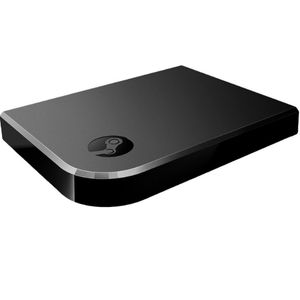
If you’re a die-hard PC gamer with a penchant for all things thrilling, you absolutely can’t miss the awesome gadget known as Steam Link. Picture it, it’s roughly the size of a deck of cards, and it’s your ticket to a seamless connection between your gaming rig and your TV. The result? You’re transported into the heart of the action, streaming your beloved games in jaw-dropping 1080p at a buttery-smooth 60Hz.
But that’s not all, folks! Steam Link is your co-pilot on this gaming journey, supporting a whole array of controllers to make you feel like you’re truly in the game. Just a pro tip: For the ultimate gaming extravaganza, opt for a wired connection to keep everything running at its peak performance.
So, buckle up and prepare for a gaming odyssey like no other! Steam Link is your magic carpet ride to a cinematic gaming experience, all from the cosy confines of your living room.
What’s Included with Steam Link
- Steam Link Device
- HDMI Out
- 100mbs Ethernet
- 3 USB2.0 ports
- Power input
- Bluetooth 4.0
- Wireless AC
- Supports many inputs, including controllers.
Buy Steam Link on Amazon Store
Click image below to buy steam link on Amazon store